[Free] Learn Illustrator Cc: Create Vector Graphic Illustration
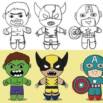
Start learning Adobe Illustrator CC by creating Five Vector Graphic Chibi Characters illustration to use as logo design
What you’ll learn
- You will be able to use Adobe Illustrator to a basic level
- You will be able to create five simple vector chibi superheroes
- You will be able to use the Pen Tool and Brush Tool to draw new custom shapes
- You will be able to create a simple vector character
- You will be able to create and manipulate basic shapes
- You will be able to apply different colours
- You will be able to create a base character template
Requirements
- Anyone who wants to learn too create Chibi Vector Gracphic Icon Style Characters
Description
This is a great way for beginners to introduce themselves to Adobe Illustrator. Starting with a basic overview of the illustration, the course will help familiarise you with the tools you will need. Each step will be broken down to make understanding the process of illustration even easier, starting with creating a simple vector design shape to creating these superhero illustration.
Follow along as we take simple vector shapes and step by step create these chibi characters.
I have included the sketch file here for you to use as reference. So you’ll be able to work alongside the videos to learn and create your own Character. Please feel free to share your creations as well!
This course is for complete beginners, so feel free to enroll in this course. You just need to have your own computer or laptop, And obviously Adobe illustrator installed.
This is a great way for beginners to introduce themselves to Adobe Illustrator. Starting with a basic overview of the illustration, the course will help familiarise you with the tools you will need. Each step will be broken down to make understanding the process of illustration even easier, starting with creating a simple vector design shape to creating these superhero illustration.
Author(s): Manvinder Jaret